
Registration
You can register using this link: https://app.lekkolot.com/registration
After registration, you need to configure the platforms you will work with. The platform accounts must have a paid plan to start working.
Open Integrations. On the left there is the list of platforms, on the right the panel of the selected platform with the Accounts and Settings tabs.
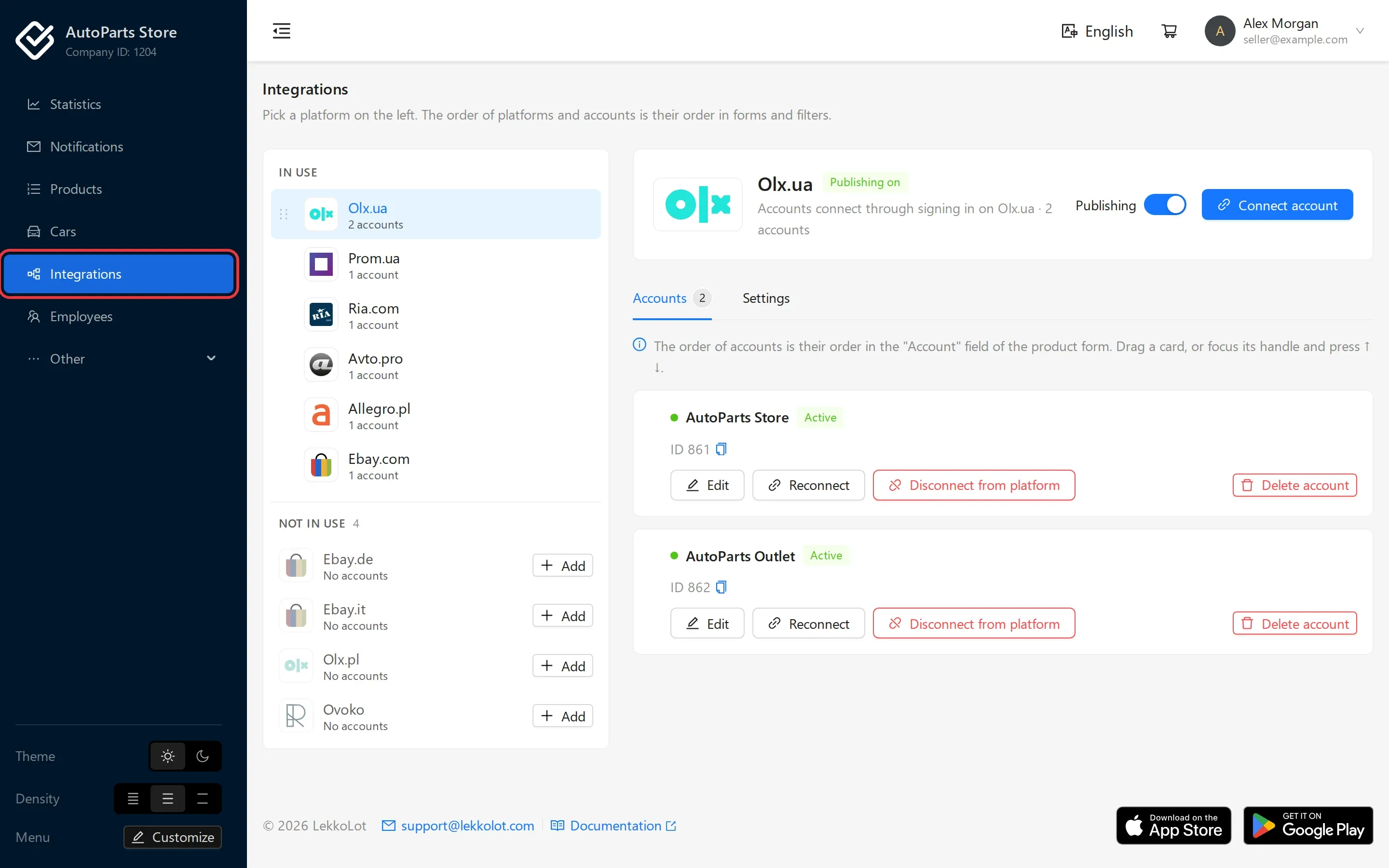
- Choose a platform in the list on the left. If it is under Not in use, click Add next to it (or Add to the platforms in use in the panel on the right): publishing to this platform is turned on.
- Add a seller account:
- for OLX, Allegro and eBay, click Connect account, and in the dialog that opens, Go to …. The platform’s website opens in a new tab: sign in with the seller account and confirm access. Once you are back, the account appears on the Accounts tab;
- for Prom.ua, RIA.com and Avtopro, click Add account and fill in the form that opens at the side.

See the platform setup instructions next. The company currency, exchange rates and account currencies are described on the Prices and currencies page.