

Common product price: one price for all platforms and currencies
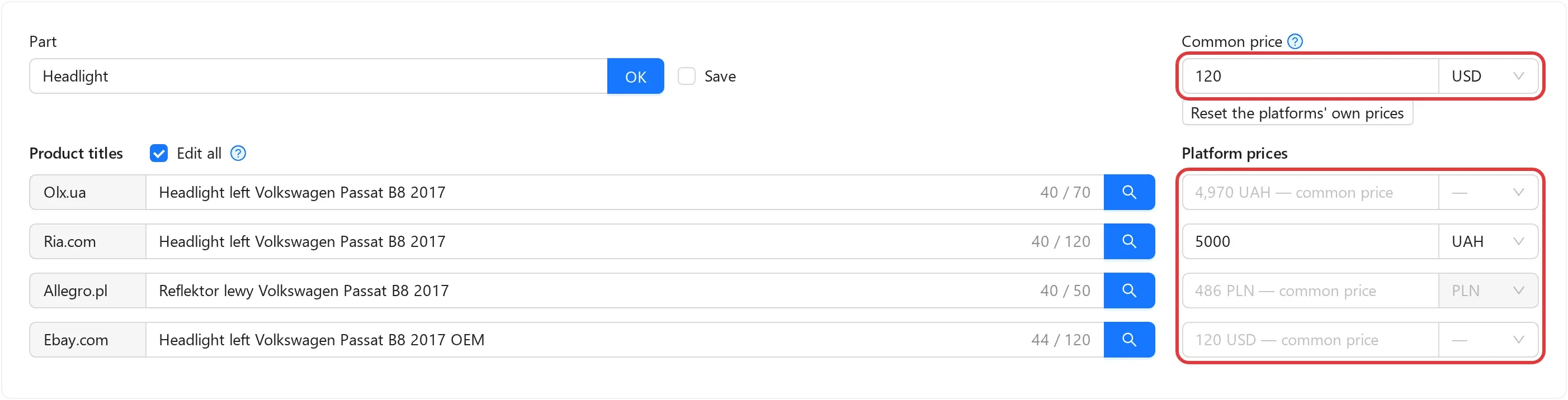
Lekkolot now has a common product price. You can set a price once, in the product itself and in the currency that suits you. Every platform you have not given a separate price lists the product at it, in the currency of its account: Lekkolot converts the price at your exchange rate and rounds it by your rules.
What it gives you
Section titled “What it gives you”- One change instead of many. Change the common price, and every listing that takes it is updated.
- Currencies are converted for you. Hryvnias on OLX and Prom.ua, zlotys on Allegro, dollars on eBay — all from one price, at the rates you set.
- Convenient amounts. Each currency can have a rounding rule, for example up to the nearest 10 hryvnias.
- A rate is changed in one place. After you save it, prices in all affected listings are updated in the background. Before saving, you see how many listings will change and by how much, and a rate change of more than 20% needs a separate confirmation, which protects against typos.
- A separate price where you need it. A platform’s own price always takes precedence, and rates and rounding never change it.
- You see the result. In the product form, an empty platform field shows the price the listing will go out with, and if the price cannot be computed, the reason, for example “no exchange rate”.
You can also set the common price through an xlsx import and sort the product list by it.
Existing products work as before
Section titled “Existing products work as before”The feature is optional. Products without a common price work as they always have: their listings take the prices entered for each platform. You can switch gradually: one product at a time, through an import, or only for new products.
To move your existing products all at once, write to support (support@lekkolot.com). We will move the prices so that no listing price changes.
We recommend trying the common price, especially if you sell on several platforms or in several currencies.
Where to start
Section titled “Where to start”- Company → Profile → the Prices card: set the company currency, add exchange rates and, if you like, rounding rules.
- Check the account currencies in Integrations, especially for OLX and Avtopro.
- Set the common price in your products, and keep a platform’s own price only where you really need it.
Step-by-step instructions with worked examples are in Prices and currencies. If a price is not computed or is not what you expected, see common problems.